Texas Roadhouse Meal Builder & Calorie Calculator
Appetizer
|
Food Item |
Calories (kcal) |
Protein (g) |
Carbs (g) |
Fat (g) |
|---|---|---|---|---|
|
Fried Pickles |
500–600 |
6–8 |
50–60 |
28–35 |
|
Boneless Buffalo Wings |
700–750 |
28–35 |
35–45 |
40–50 |
|
Grilled Shrimp Appetizer |
300–380 |
22–28 |
8–12 |
18–22 |
|
Tater Skins |
1100–1300 |
18–22 |
90–110 |
70–85 |
|
Texas Red Chili (Cup) |
220–280 |
15–20 |
18–25 |
10–14 |
Steaks
|
Food Item |
Calories (kcal) |
Protein (g) |
Carbs (g) |
Fat (g) |
|---|---|---|---|---|
|
Hand-Cut Sirloin |
240–300 |
30–38 |
0–2 |
12–18 |
|
Dallas Filet |
250–320 |
28–34 |
0–2 |
14–20 |
|
New York Strip |
400–500 |
35–45 |
0–2 |
28–36 |
|
Ribeye Steak |
900–1100 |
50–65 |
0–3 |
75–90 |
|
Filet & Shrimp Combo |
600–750 |
45–55 |
8–15 |
35–45 |
Sides
|
Food Item |
Calories (kcal) |
Protein (g) |
Carbs (g) |
Fat (g) |
|---|---|---|---|---|
|
Steak Fries |
320–400 |
4–6 |
45–55 |
15–20 |
|
Mashed Potatoes |
240–300 |
4–6 |
30–40 |
10–15 |
|
Steamed Broccoli |
180–220 |
5–7 |
10–15 |
8–12 |
|
Buttered Corn |
180–220 |
3–5 |
20–30 |
8–12 |
|
Baked Potato |
350–420 |
7–9 |
50–60 |
12–18 |
Drinks
|
Food Item |
Calories (kcal) |
Protein (g) |
Carbs (g) |
Fat (g) |
|---|---|---|---|---|
|
Iced Tea (Unsweet) |
0–5 |
0 |
0–1 |
0 |
|
Sweet Tea |
140–180 |
0 |
35–45 |
0 |
|
Lemonade |
110–140 |
0 |
28–35 |
0 |
|
Fountain Soda |
140–180 |
0 |
35–45 |
0 |
|
Margarita |
220–300 |
0 |
20–35 |
0–2 |
Desserts
|
Food Item |
Calories (kcal) |
Protein (g) |
Carbs (g) |
Fat (g) |
|---|---|---|---|---|
|
Chocolate Brownie |
1000–1200 |
10–15 |
120–140 |
55–70 |
|
Apple Pie Dessert |
900–1100 |
6–10 |
130–150 |
40–55 |
|
Cheesecake (Slice) |
700–850 |
8–12 |
60–80 |
45–55 |
High-Calorie Items
- Cactus Blossom
- Bone-In Ribeye
- Big Ol’ Brownie
- Cheese Fries
Healthy Options
- Grilled Chicken
- Grilled Salmon
- Steamed Vegetables
- House Salad
Balanced Choices
- Sirloin Steak
- BBQ Chicken
- Baked Potato
Are you confused about choosing a good meal for your daily routine at Texas Roadhouse? Is it difficult for you to choose a healthy, balanced meal? And do you feel very uninformed about food?
Don’t worry! Here is the solution to your problem. The calorie calculator is the tool here to solve your problem. This helps you to choose your meal according to your taste. You can choose a meal and track the calories of Texas Roadhouse Menu. It helps make your day special.
What is a Meal Builder Calorie Calculator?
The meal builder tool is the tool that helps you select the items from the menu. First of all, you have to choose the main menu. Then you have other options to choose from other dishes. You can also check healthy suggestions. It gives you a calorie tracker.
You can add multiple items to your favorites. It tells you about every meal’s calories, fats, carbohydrates, and protein. It’s the best tool that builds your meal in a second.
Key Features of the Tool
The tool includes many useful features:
Multi-Item Selection
The meal builder calorie calculator tool helps you to choose multiple items from appetizers, steaks, salads, desserts, and many more.
It’s the best part for you to choose the menu and get multiple options.
Real-Time Nutrition Updates
The tool gives you real updates about every dish. It tells you about calories, carbohydrates, fats, and protein.
Category-Based Navigation
You can check many categories on the tool. Its categories are based on appetizers, hand-cut steaks, and desserts.
Smart Suggestions
It also gives you healthy suggestions according to your diet. It is the best tool for you to take your diet seriously.
Interactive UI
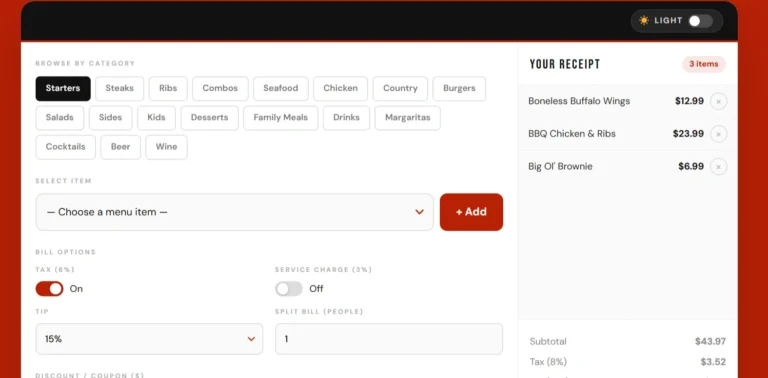
Meal Builder is user-friendly and advanced. You can experience smoothness and easily add items that are shown below the search bar.
How to Use the Calorie Calculator?
Here is the complete guide for using the meal builder.
- Choose a category at the top of the tool.
- Hover over the search bar and select your favorite dish.
- Click Add Item. You can add multiple items.
- Your added items appear in the middle section.
- You can view healthy suggestions.
- Finally, check totals and nutritional breakdowns.
Benefits of Using This Tool
- It helps you to save time (no manual calculation)
- Helps in diet planning in your daily routine
- Useful for gym users and health-conscious people
- Improves awareness of food intake and gives you better choices
- Easy to use for beginners
Practical Tips
This tool will give you practical tips:
- Combine items wisely
- Watch high-calorie foods carefully
- Use the healthy suggestion toggle at the top of the bottom line
- Balance protein, carbs, and fat according to your diet and health
Why This Tool is Better Than Other Calculators?
Because it has a real calculation of the meal. It is interactive and menu-based. It chooses your meal in seconds. It does not need lengthy calculations — just select and add items easily.
With other calculators, it is difficult to determine the generic food intake needs. You have to do manual calculations on other calculators, but this tool is easy to use.
Nutritional Breakdown of Calorie Calculator
Calories
Calories are a type of energy that you get from food and drinks. It gives you the power to complete your daily work and physical hard work. Calories are burned, allowing you to take a breath and think.
- Weight Management
Calorie intake and burn help a person manage weight. It helps you lose or gain weight by eating food and drinks. - Fitness Tracking
It tracks your consumed food and work expanded. - Balanced Diet Planning
It helps you to know about food, and you can do a diet consistently.
Protein
Protein is the nutrient that helps you grow and repair your skin. It is essential for your health, muscles, hormone production, etc.
- Weight Management
Protein gives power to your body for a long time without overeating. - Fitness Tracking
It helps you to recover your muscles during exercise and hard work. - Balanced Diet Planning
It plans a better diet for you, like amino acids, which are good and healthy for your health.
Carbohydrates
Carbohydrates are found in green vegetables, grains, fruits, and dairy products. Your diet needs to be based on healthy and nutritious food sources.
- Weight Management
Through monitoring of carbohydrates, the tool guides you to take in minimal carbs in your body. - Fitness Tracking
It gives you energy for your daily routine work and workouts. - Balanced Diet Planning
It gives you the best track of diet planning and gets you a balanced diet. You should choose the best energy levels.
Fats
Fat is a macronutrient that gives you essential nutrients, energy, and absorption of nutrients. Fat consists of two types: healthy and unhealthy fats.
- Weight Management
Healthy fats help you control your appetite and stop overeating. - Fitness Tracking
It tracks your fitness and then gives you healthy fats for your body. - Balanced Diet Planning
It ensures that the person takes healthy and soluble fats in the body.
Healthy Suggestions Feature
One of the best characteristics of the tool is that it gives you healthy suggestions. According to your diet, the best advice is for your health.
It categorizes the meals, like low calories are healthy, medium calories are moderate, and high calories are heavy on your body.
Who Should Use This Tool?
- Fitness enthusiasts
- Diet planners
- Casual restaurant visitors
- People tracking calories
- Anyone wanting healthier eating habits
Conclusion
It’s the best tool through which you can select your menu in seconds. First, you try it, and then you get a better experience because of its unique characteristics.